Ask a growing business how it manages its people and its suppliers and the honest answer is usually a patchwork. An HR tool handles attendance and payroll. Job applications arrive by email or from a job board. Vendors live in a spreadsheet, quotations sit in inboxes, and purchase approvals happen in a chat thread that nobody can search a year later.
Each of those tools works on its own. The trouble is everything between them: the same names typed twice, the same approval chased on three channels, and a monthly report that needs four exports and an afternoon of reconciling. An HRMS with vendor management closes that gap by putting people and suppliers on one set of records.
This guide explains what that combination actually means, where separate tools quietly cost you money, how hiring and procurement turn out to be the same kind of workflow, and how to decide whether a combined platform is right for your business.
What "HR plus vendor management" actually means
It does not mean a heavy ERP that takes six months to implement. It means one platform where the departments, designations and users you already maintain for HR are the same ones that raise purchase orders and approve bills, and where hiring and procurement follow the same pattern: publish something, receive responses, compare them and record a decision.
In practice a combined platform covers four areas:
- HR and payroll: attendance, leave, shifts, salary generation and payslips
- Hiring: jobs, applicants, candidate profiles, interviews and letters
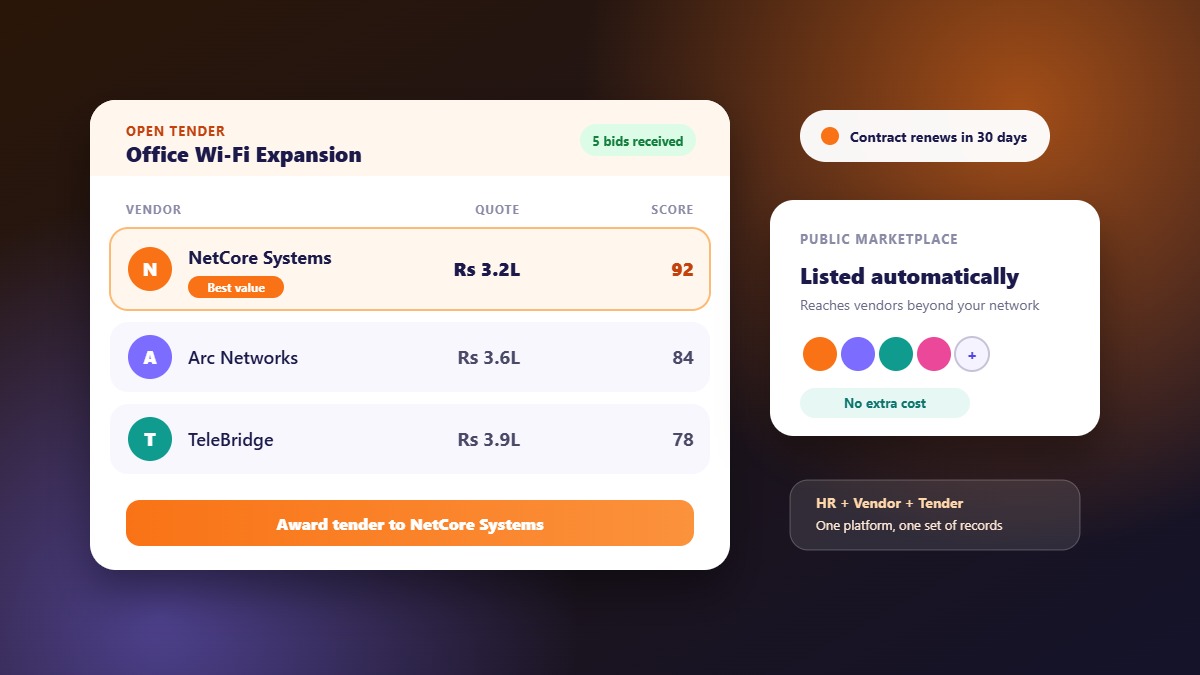
- Vendors and tenders: a vendor list, tenders, bids and messages with bidders
- Purchasing and finance: purchase orders, bills, invoices and expenses
The point is not that every module is the deepest in its category. The point is that they share data, so nobody re-enters it and nothing drifts out of sync.
Why most businesses end up with separate tools
Nobody sets out to build a patchwork. It grows one problem at a time. Payroll becomes painful, so you buy an HR tool. Hiring picks up, so you add a job board account. A supplier asks for a purchase order, so someone makes a template in a spreadsheet. Each decision is sensible in isolation. After three years the company runs on five systems that do not know about each other.
The costs of that arrangement are rarely on any invoice, which is why they persist.
Where separate tools quietly cost you
Duplicate data entry
When a department is renamed, an employee leaves or a manager changes, every tool needs the same update. Miss one and approvals route to the wrong person or a former employee still has access to something they should not.
Approvals with no trail
A quotation approved in a chat thread is hard to find six months later, and harder to defend in an audit or a dispute with a supplier. When the tender, the bid, the purchase order and the bill sit in one system, the trail exists without anyone building it.
Reports nobody trusts
If headcount comes from one tool and spend from another, any ratio between them (cost per employee, spend per department) is assembled by hand and argued about. One platform can answer both questions from the same records.
Onboarding and offboarding gaps
New joiners need accounts, assets and access. Leavers need all of it revoked. When HR and asset tracking are separate, laptops and licences are the things that get forgotten.
Licence sprawl
Five subscriptions with five minimum fees usually cost more than one platform priced per employee, before counting the time spent administering them.
Hiring and procurement are the same workflow
At first glance recruitment and vendor management look unrelated. Look at the steps and they match almost exactly.
| Step | Hiring | Vendor and tender |
|---|---|---|
| Publish | Post a job with requirements | Publish a tender with specifications |
| Receive responses | Candidates apply | Vendors submit bids |
| Communicate | Schedule interviews, answer questions | Answer bidder questions in one place |
| Compare | Shortlist against the role | Score bids against criteria |
| Decide | Approve or reject, issue a letter | Award, issue a purchase order |
| Record | Candidate becomes an employee | Bidder becomes an approved vendor with bills |
A platform that treats both as the same shape of workflow gives your team one habit to learn instead of two, and gives you one place to look when someone asks "what happened with that?"
What to look for in a combined platform
Shared master data
Employees, departments, designations and users should be defined once and used everywhere. Ask how a department rename flows through the product.
Permissions by role
Procurement data and payroll data are sensitive in different ways. You want to give each person only the modules they need, based on their designation, with the ability to override for an individual when required.
A real vendor workflow, not just a contact list
A list of vendors with phone numbers is a spreadsheet in a nicer font. Look for tenders, bids, bidder messages, purchase orders with status, bills with payments, and invoices with tax handling.
Mobile access for everyone involved
Employees check attendance and leave on their phones. Candidates track applications. Vendors browse tenders and follow bid status. If only the admin has a good interface, adoption stalls.
Reports and exports
Finance, HR and procurement each want their own answers. Filterable reports with exports mean they do not have to ask someone to build a spreadsheet.
Per-employee pricing and a real trial
Pricing that follows headcount is easier to predict, and a trial with every feature enabled lets you test your own policies rather than a demo.
A practical example
Consider a 60-person services company that hires a few people each quarter and buys equipment, software and facilities services regularly.
- Hiring: the HR manager publishes a job, applicants arrive in one list, interviews are scheduled and approved, and the selected candidate is issued an offer letter from a template
- Day to day: employees mark attendance and apply for leave from the app, managers approve, and payroll builds salary from that record
- Purchasing: the operations lead publishes a tender for new laptops, receives bids, answers questions in one place, picks a vendor and raises a purchase order
- Afterwards: the bill is recorded against the purchase order, the laptops are added to the asset list and allocated to the new joiners
Four separate processes, one login, one set of employee and department records. Nothing in that story requires an enterprise suite.
When a combined platform is not the right choice
Be honest about fit. A combined platform is probably not for you if:
- You only need payroll and nothing else, in which case a payroll-only tool is simpler
- Procurement is a full department with its own specialist software and approval chains
- You are a large enterprise with global payroll and complex entity structures
- Your vendor relationships are a handful of long-standing suppliers with no tenders or quotations
It fits best when you are small to mid-sized, hire a few times a year, buy from vendors regularly and want fewer systems rather than more.
How to move from separate tools to one platform
- List what you use today and what each tool is actually used for. You will often find overlap
- Start with the most painful process. For most teams that is attendance and payroll
- Import your employees from a CSV or Excel file rather than retyping them
- Configure policies once: leave types, shifts, holidays, departments and designations
- Add hiring next, then vendors and tenders, once the team trusts the basics
- Switch off the old tools only after one full payroll cycle runs cleanly on the new system
How WibesHR approaches it
WibesHR puts these areas side by side. The HR and payroll module covers attendance, leave, shifts and salary. The hiring module handles jobs, applicants and interviews. The vendor and tender module covers vendors, tenders, bids, purchase orders and bills. A single admin panel sits on top with permissions by designation, activity logs and reports.
Jobs and tenders you publish are also listed on the public WibesHR job marketplace and tender marketplace, so candidates and vendors outside your own network can discover them. Plans are priced per employee per month, and every new workspace gets a 7-day free trial with all features.
Frequently asked questions
What is an HRMS with vendor management?
It is a platform that combines HR and payroll with vendor, tender and purchasing workflows on shared employee and department records, so people management and procurement do not need separate tools.
Is it only for large companies?
No. It suits small and mid-sized businesses best, because they feel the cost of five disconnected tools more and do not have a team to maintain integrations.
Do I have to use every module?
No. Many teams start with HR and payroll and add hiring or vendor management later. The shared data means the later modules start with your employees and departments already in place.
How is vendor management different from procurement software?
Vendor management focuses on the supplier relationship: onboarding, tenders, bids and communication. Procurement software usually adds deeper sourcing and spend analytics. For most small and mid-sized businesses, vendor management with purchase orders and bills covers what is needed.
Can I try it before paying?
Yes. A WibesHR workspace starts with a 7-day free trial and access to every feature, with no payment details required.
If you want to see how your own setup would map, start a free trial or talk to the team.