Ask most growing businesses how they manage vendors, and the honest answer is: a WhatsApp group, a shared drive full of PDFs, and whoever remembers which supplier quoted what last quarter. It works, until it doesn't — a contract renews itself nobody meant to renew, a tender goes out to the same three vendors because nobody had time to find a fourth, or a payment gets delayed because the approval was buried in someone's inbox.
Vendor management software exists to fix exactly that. Here's what it actually does, what to look for, and why treating it as a separate system from HR and finance usually costs you more than it saves.
What vendor management software actually does
At its core, vendor management software gives you one place to register vendors, publish tenders or purchase requests, collect and compare bids, track contracts and documents, and monitor vendor performance over time — instead of scattering that across email, spreadsheets, and individual relationships.
For a growing business, the real value isn't the software itself — it's what it replaces: the manual chasing, the missed renewal dates, and the total lack of visibility into which vendors are actually reliable and which ones you keep working with out of habit.
The core features worth actually caring about
Vendor management platforms can get bloated with enterprise features built for procurement teams managing thousands of suppliers. For a growing business, a much shorter list matters:
- Vendor self-registration and onboarding — vendors fill in their own details and upload their own documents instead of your team doing data entry for them
- Centralized vendor records — one profile per vendor with their history, documents, and past tenders, instead of hunting through old emails
- Tender or purchase-request publishing — post a requirement once and let qualified vendors respond, rather than manually emailing a shortlist every time
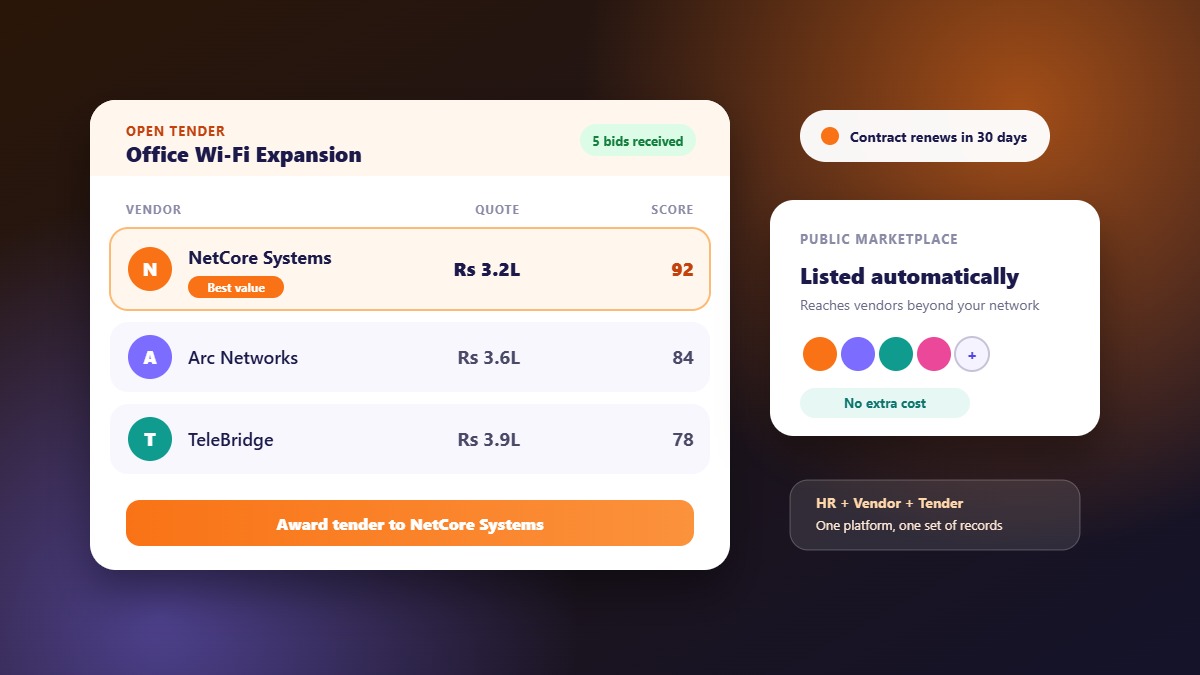
- Bid comparison — see submitted quotations side by side instead of toggling between PDFs
- Document and contract tracking — know what's expiring before it expires, not after
- Approval workflows — purchase orders and payments that route to the right person automatically, instead of waiting on whoever happens to check their email
Self-registration and renewal alerts alone tend to pay for the platform — a single missed auto-renewal or a single vendor who slipped through without proper documentation can cost more than a year of software.
Why keeping it separate from HR costs you more than it saves
Most businesses treat vendor management as procurement's problem and HR software as HR's problem, run on two completely different systems that never talk to each other. In practice, that split creates three recurring issues:
- Duplicate data entry. Vendor and contractor details, approvals, and payment information get entered once in the vendor system and again in finance or HR, with no shared source of truth.
- No shared visibility. HR doesn't know which vendors are active or under review; procurement doesn't know which internal budget owner approved what. Every cross-department question becomes an email thread.
- Two logins, two training efforts, two support relationships — for problems that are really one workflow: your business bringing in outside people and outside companies to get work done.
WibesHR takes the opposite approach: vendor and tender management lives in the same platform as HR, payroll, and recruitment, on the same employee and company records — so a purchase order, a contractor payment, and a new hire's onboarding are all visible from one dashboard, not three disconnected tools.
The feature almost no other platform offers: a public vendor marketplace
Here's the part most vendor management software misses entirely. Publishing a tender on a typical platform only reaches vendors you already know about — it's still an isolated, private list, just a tidier one than a spreadsheet.
WibesHR publishes every tender to a shared, public tender marketplace automatically, at no extra cost. That means your procurement requirement is visible to vendors beyond your own existing network — not just the same three suppliers you've worked with for years — without you running a separate sourcing effort or paying for a separate listing service. The same applies on the hiring side: job postings go out through a public talent marketplace shared across every business on the platform, not a career page only people who already know your company will ever find.
A short checklist for choosing vendor management software
- Does it let vendors self-register and self-update, or does your team still do the data entry?
- Can you publish a tender and compare bids without exporting everything to a spreadsheet first?
- Does it track contract and document expiry with actual alerts, not just a date field nobody checks?
- Does it share data with your HR and finance systems, or is it yet another disconnected login?
- Does it help you reach vendors beyond the ones you already know, or just organize the ones you've already got?
Common mistakes businesses make
- Buying enterprise-grade procurement software for a 20-vendor operation. You'll pay for complexity you'll never use and fight the interface for features built for a different scale of business.
- Not setting renewal and expiry alerts on day one. This is the single most common reason teams go back to manually tracking contracts within a few months.
- Assuming "vendor management" and "procurement" are the same as "HR." They're related workflows that benefit enormously from living in one system — but only if the platform was actually built that way, not bolted together after the fact.
How a vendor management process works end to end
Understanding the stages helps you judge which software features really matter.
- Need identified. A department raises a requirement, with quantity, specification and budget
- Vendor sourcing. You invite known vendors, and publish the requirement so new ones can respond
- Tender and bids. Vendors submit quotations with documents, and ask questions
- Evaluation. Bids are compared against price, quality, delivery and past performance
- Award. The chosen vendor is notified and a purchase order is raised
- Delivery and acceptance. Goods or services are received and checked
- Billing and payment. The bill is matched to the purchase order and paid
- Review. Performance is recorded for the next time
Software that supports only stage two (a list of contacts) leaves the real work in spreadsheets. Look for coverage from tender through to bill.
Documents and records you should keep for every vendor
- Company details, contact person and address
- Registrations and tax details relevant to your purchase
- Quotations and the tender they responded to
- Purchase orders with status and delivery dates
- Bills, payments and invoices
- Messages and clarifications exchanged
- Notes on delivery quality and issues
Keeping these together is what makes audits, disputes and renewals painless. Scattered across email and drives, the same records take days to reconstruct.
How to measure vendor performance
You do not need a complex scorecard. Four simple measures cover most cases:
- On-time delivery: orders delivered by the promised date
- Quality: items accepted without rework or return
- Price consistency: final bill matches the quotation
- Responsiveness: how quickly they answer questions and fix problems
Recording these after each order gives you evidence for the next tender. When two bids are close, past performance is often what decides.
Typical savings and risks
The benefit of a structured process is not a magic discount. It is fewer surprises. More vendors see your requirement, so prices become competitive. Clear scope reduces change requests. A recorded trail reduces disputes. The risk to manage is the opposite: adopting software without defining who approves what, so the process exists on screen but not in practice. Agree approval limits and owners first.
A simple rollout plan
- Import your current vendor list and clean duplicates
- Define categories and who may raise tenders and purchase orders
- Run your next real purchase through the system, end to end
- Review after one month: what was slow, what was skipped
- Add the rest of your purchases gradually
Frequently asked questions
Is vendor management software worth it for a small business?
Yes, if you're currently tracking vendors across email and spreadsheets. The time saved on vendor onboarding, bid comparison, and contract renewal tracking typically outweighs the cost quickly, especially once you factor in the cost of a single missed renewal or compliance gap.
What's the difference between vendor management and procurement software?
Procurement software usually covers the full purchase-to-pay cycle for large organizations. Vendor management software focuses specifically on vendor records, tenders, bids, and relationships — the part that matters most for growing businesses without a dedicated procurement team.
Can vendor management really integrate with HR software?
Yes, when both run on the same platform. WibesHR runs HR, payroll, recruitment, and vendor/tender management on one shared system, so there's one login, one set of company records, and no manual syncing between departments.
How is WibesHR's tender marketplace different from posting a tender privately?
A private tender only reaches vendors you already know. WibesHR automatically publishes every tender to a shared public marketplace across the platform, so qualified vendors beyond your existing network can discover and bid on it, at no extra cost.